List of Available APIs
This section describes the list of APIs provided by Suivi. This list is accessible from your site's URL by entering swagger at the end (e.g.: https://domain.suivi.co/swagger).
Note that the swagger page has been enhanced with the schema for each available root.
Board Mapping API
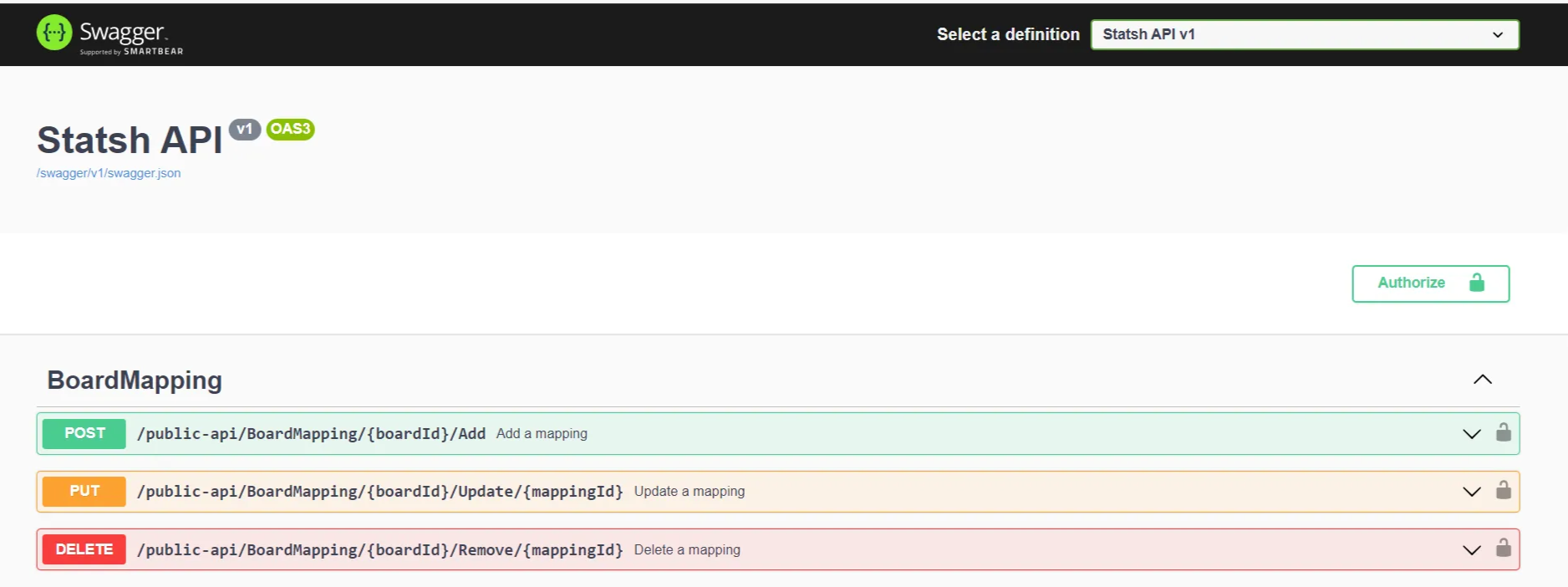
The BoardMapping API allows you to:
- Add a board mapping following a recurring import
- Update a board mapping,
- Delete a board mapping.
Boards API
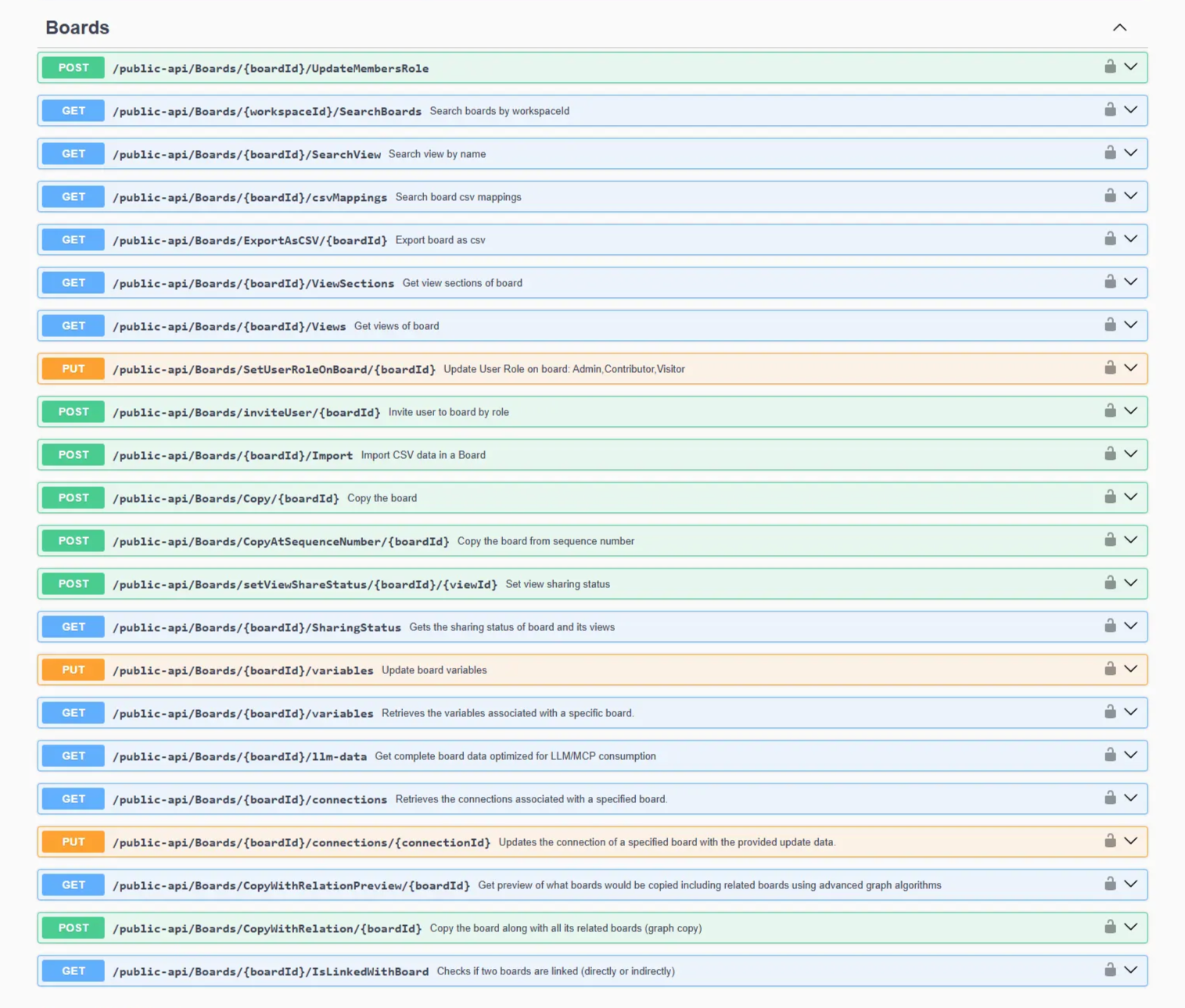
The Boards API allows you to perform actions related to boards such as:
- Update the roles of specified members (user and/or team),
- Search the list of boards in a workspace,
- Search for a board view by name,
- Search for CSV import mappings of a board,
- Export a board to CSV format,
- Retrieve the list of sections in a board
- Retrieve the list of views in a board
- Change a user's role to an admin, contributor, or visitor role
- Invite users to a board and assign them a role,
- Import CSV data into a board,
- Copy a board,
- Copy a board from a sequence number,
- Change the sharing status of a view,
- Know the shared status of a board's views,
- Modify a board's variables,
- Retrieve the list of variables used in a board,
- Retrieve the list of connections used in a board,
- Modify the connections of a board,
- Provide an overview of linked boards that will be duplicated when duplicating a board,
- Duplicate a board and all its linked boards,
- Check the links between two boards.
BoardWebHook API
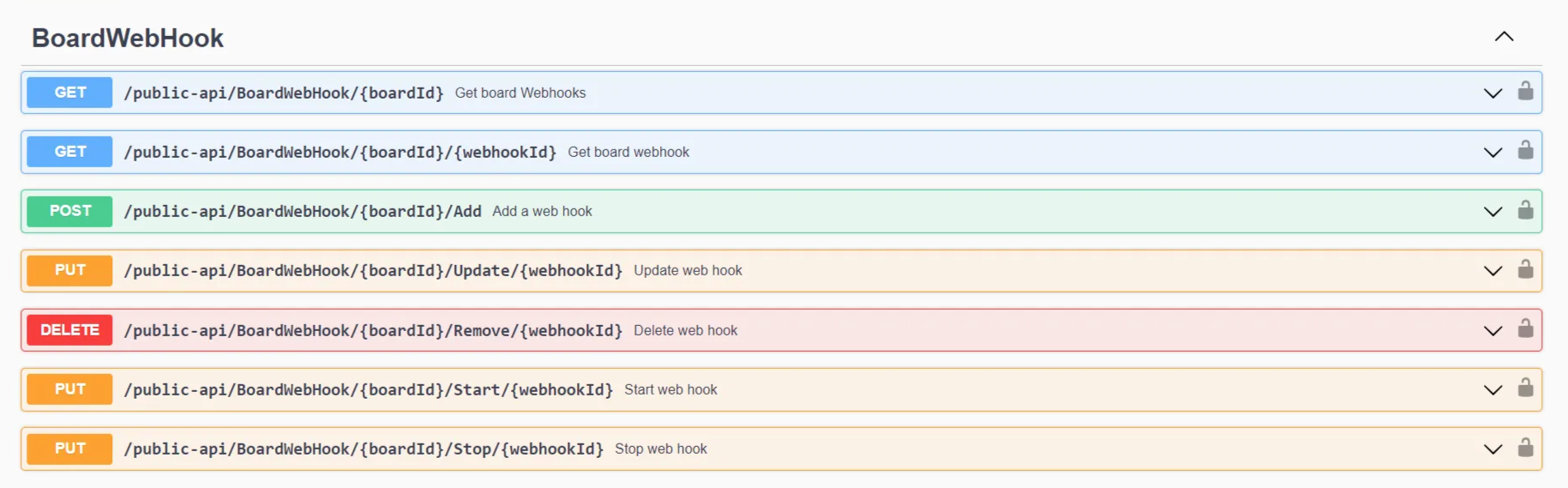
The BoardWebhook API allows you to:
- Get the webhooks of a board by board identifier,
- Get the webhooks of a board by webhook identifier,
- Add a webhook,
- Delete a webhook,
- Trigger a webhook,
- Stop a webhook.
API Book
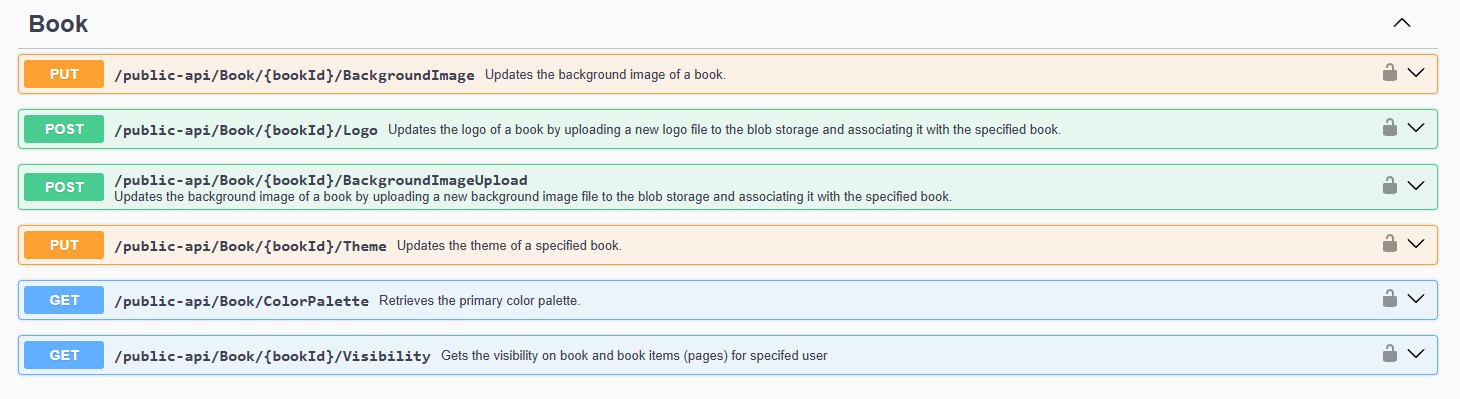
The Book API allows you to:
- Customize the book background with an image provided by URL or by file transmitted in blob storage,
- Customize the book logos (small and large),
- Customize the book theme (light, solid, image),
- Customize the primary color of the book for solid theme type,
- Verify that a user has the right to view a book and a book element.
API Context

The Context API allows you to know the context related to the current user.
API Tenants
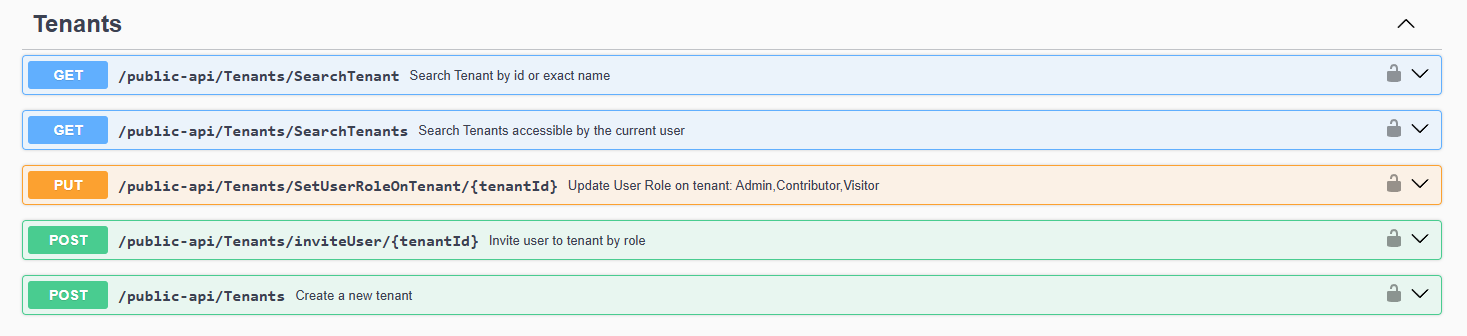
The Tenants API allows you to:
- Search for a tenant by name (exact),
- Search for the list of tenants accessible by a user,
- Update user roles for the tenant (Admin, Contributor, and Visitor),
- Invite a user and assign them a role on a tenant,
- Create a new tenant.
API Users

The Users API allows you to:
- Search for a user by last name, first name, and email address,
- Create and modify a user
API Workspaces

The Workspaces API allows you to:
- Search the list of workspaces accessible by a user,
- Modify the Admin, Contributor, or Visitor roles of a user in a workspace,
- Invite a user and assign them a role in a workspace,
- Create a new workspace.
Authentication and API Access
Obtaining an API Key
Connecting to Suivi APIs requires providing an API key associated with an Admin user account of the tenant.
To find this key, simply click on the avatar in the workspace and choose > Edit my profile, API key tab.
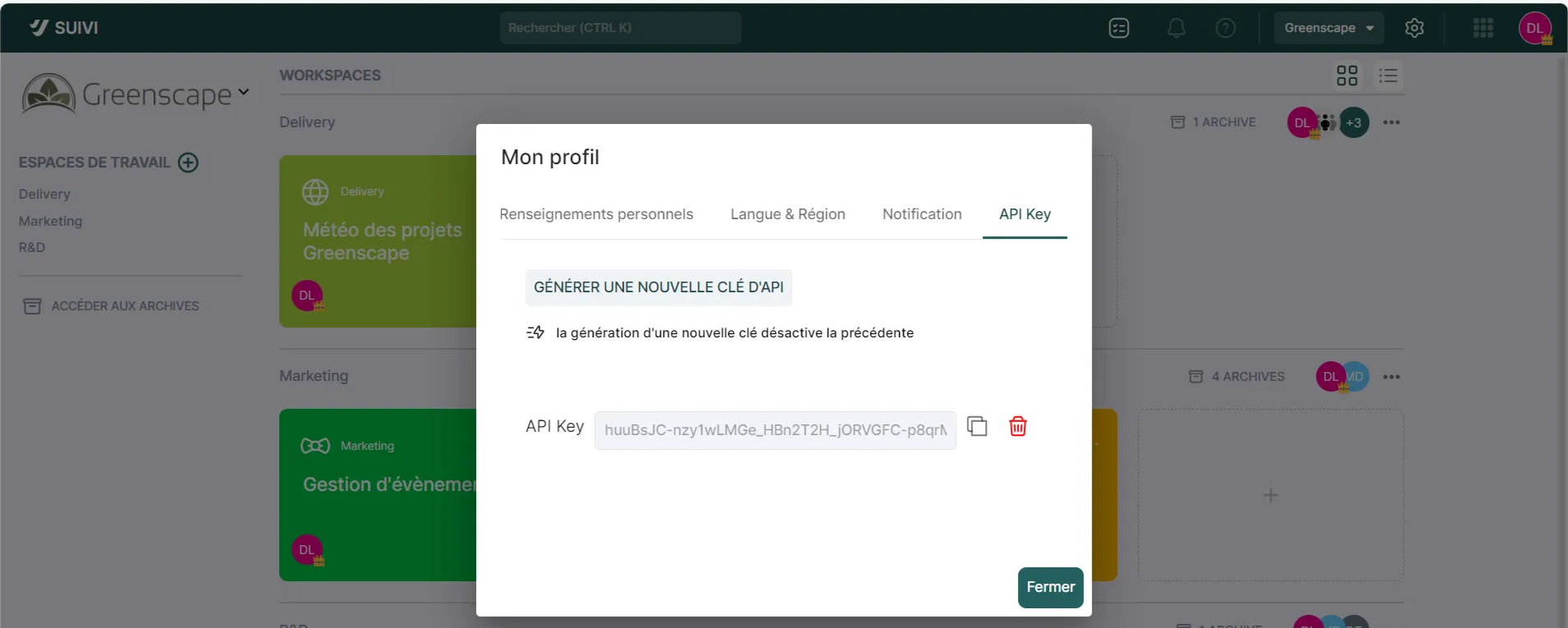
Note that it is possible to generate a new key, but there is always only one API key per tenant (the old key is therefore deactivated).
Accessing the Swagger API
This section describes the list of APIs provided by Suivi. This list is accessible from your site's URL by entering swagger at the end (e.g.: https://domain.suivi.co/swagger).
Note that the swagger page has been enhanced with the schema of each available root.
This key will be necessary to connect to the Suivi Swagger API such as:
🔐
API Key: my-api-key
This key must be included in the user-api-key header of all your requests.
Book (portal)
The Book section groups together all the endpoints for customizing the appearance and content of a book in your application.
Modifying a Book's Background Image
There are two ways to change the background image:
- By sending the URL of an image available on the internet
- By uploading a file
Modification by URL
Method: PUT
URL: public-api/Book/{BookId}/BackgroundImage
Parameters:
- The ID of the book you want to modify, which is found in the request URL
- The JSON in the request body that contains the image URL
Request body:
Example:
Modification by Image Upload
Method: POST
URL: public-api/Book/{BookId}/BackgroundImageUpload
Parameters:
{ "ImageUrl": "string"}curl -X 'PUT' \ '[https://localhost:5001/public-api/Book/02F5GFJM403K9N9B8TCWTHAB4A/BackgroundImage](https://localhost:5001/public-api/Book/02F5GFJM403K9N9B8TCWTHAB4A/BackgroundImage)' \ -H 'accept: */*' \ -H 'user-api-key: my-api-key' \ -H 'Content-Type: application/json' \ -d '{ "ImageUrl": "[https://www.image.fr/mon_image.png](https://www.image.fr/mon_image.png)"}'- The ID of the book you want to modify, which is found in the request URL
- The image as a file in the request body
Example:
Modifying a book's logo
There are two logos to upload in this method:
curl -X 'POST' \ '[https://localhost:5001/public-api/Book/02F5GFJM403K9N9B8TCWTHAB4A/BackgroundImageUpload](https://localhost:5001/public-api/Book/02F5GFJM403K9N9B8TCWTHAB4A/BackgroundImageUpload)' \ -H 'accept: */*' \ -H 'user-api-key: my-api-key' \ -H 'Content-Type: multipart/form-data' \ -F '[email protected];type=image/jpeg'- The classic logo that displays on the book
- The responsive logo for mobile display
Method: POST
URL: public-api/Book/{BookId}/Logo
Parameters:
- The ID of the book you want to modify, which is found in the request URL
- The image as a file in the request body for the standard logo
- The image as a file in the request body for the responsive logo
Example:
Modifying the theme
There are three types of themes for a book:
curl -X 'POST' \ '[https://localhost:5001/public-api/Book/02F5GFJM403K9N9B8TCWTHAB4A/Logo](https://localhost:5001/public-api/Book/02F5GFJM403K9N9B8TCWTHAB4A/Logo)' \ -H 'accept: */*' \ -H 'user-api-key: my-api-key' \ -H 'Content-Type: multipart/form-data' \ -F '[email protected];type=image/png' \ -F '[email protected];type=image/png'- Light: The book will have a white banner on the left with a color for the titles on mouse hover
- Dark: The book will have a banner in the selected color
- Transparent: The banner will be transparent and will show the background image
Colors are defined in a key-value table that you can retrieve via the dedicated endpoint (see the "Retrieving theme colors" section below).
Method: PUT
URL: public-api/Book/{BookId}/Theme
Parameters:
- The ID of the book you want to modify, which is found in the request URL
- The theme transmitted in the request body. Possible values:
- Light
- Dark
- Transparent
- The color transmitted in the request body, in the form of an integer corresponding to the index of the desired color in the color array provided by the API
Request body:
Example:
Retrieving theme colors
Retrieves the available colors for a book's theme. The API returns a key-value array containing the index and the hexadecimal value of the associated color.
Method: GET
URL: public-api/Book/ColorPalette
Response:
Example:
Board
The Board section groups the endpoints for managing a board's variables and connections.
Retrieving variables
It is possible to retrieve all variables from a board.
Method: GET
URL: public-api/Boards/{BoardId}/variables
Parameters:
{ "Theme": "string", "ColorIndex": 0}curl -X 'PUT' \ '[https://localhost:5001/public-api/Book/02F5GFJM403K9N9B8TCWTHAB4A/Theme](https://localhost:5001/public-api/Book/02F5GFJM403K9N9B8TCWTHAB4A/Theme)' \ -H 'accept: */*' \ -H 'user-api-key: my-api-key' \ -H 'Content-Type: application/json' \ -d '{ "Theme": "Transparent", "ColorIndex": 5}'{ "0": "#000000", "1": "#303E4D", "2": "#667684", "3": "#B5BCC2", "4": "#0652A7", "5": "#3082B7", "...": "..."}curl -X 'GET' \ '[https://localhost:5001/public-api/Book/ColorPalette](https://localhost:5001/public-api/Book/ColorPalette)' \ -H 'accept: */*' \ -H 'user-api-key: my-api-key'- The board ID found in the request URL
Response:
Example:
Modifying variables
{ "Var01": "Val01", "Var02": "NewVal02", "Var03": "Val03"}curl -X 'GET' \ '[https://localhost:5001/public-api/Boards/01F5GFJM403K9N9B8TCWTHAB4A/variables](https://localhost:5001/public-api/Boards/01F5GFJM403K9N9B8TCWTHAB4A/variables)' \ -H 'accept: */*' \ -H 'user-api-key: my-api-key'
The provided list will replace existing variables. It is recommended to retrieve the variables first and then send the complete list of desired variables.
Method: PUT
URL: public-api/Boards/{BoardId}/variables
Parameters:
- The board ID found in the request URL
- JSON with the list of variables in the request body
Request body:
Example:
Retrieving connections
It is possible to retrieve the connections of a board.
{ "var1": "Plop", "var2": "65536"}curl -X 'PUT' \ '[https://localhost:5001/public-api/Boards/01F5GFJM403K9N9B8TCWTHAB4A/variables](https://localhost:5001/public-api/Boards/01F5GFJM403K9N9B8TCWTHAB4A/variables)' \ -H 'accept: */*' \ -H 'user-api-key: my-api-key' \ -H 'Content-Type: application/json' \ -d '{ "var1": "Plop", "var2": "65536"}'
Sensitive information such as secrets for tokens or header values are not displayed by the API.
The displayed response takes into account the two types of connections existing in the application:
- Azure DevOps Connection
- HTTP Connection
Method: GET
URL: public-api/Boards/{BoardId}/connections
Parameters:
- The board ID found in the request URL
Example:
Response:
Modifying a Connection
Modifying a connection is possible but requires following certain rules. To do this, we first need the connection ID, which can be retrieved via the API, and then provide a properly configured JSON based on what we want to do.
curl -X 'GET' \ '[https://localhost:5001/public-api/Boards/01F5GFJM403K9N9B8TCWTHAB4A/connections](https://localhost:5001/public-api/Boards/01F5GFJM403K9N9B8TCWTHAB4A/connections)' \ -H 'accept: */*' \ -H 'user-api-key: my-api-key'{ "01JE6DY43AC7R7S2TPDAPJJ16E": { "Id": "01JE6DY43AC7R7S2TPDAPJJ16E", "Name": "TestFixed", "Type": "AzureDevOps", "Properties": { "Organization": "statshvss", "PersonalToken": "***" } }, "01JHJS7BQKH6SHMBMR7JFTNAFY": { "Id": "01JHJS7BQKH6SHMBMR7JFTNAFY", "Name": "TestHttp", "Type": "Http", "Properties": { "BaseUrl": "[https://www.google.com](https://www.google.com)", "Headers": [ "C", "B" ] } }}The type must always be kept in the JSON, even if it will not be modified.
Possible actions:
- Add an attribute
- Modify an attribute value
- Delete an attribute
Method: PUT
URL: public-api/Boards/{BoardId}/connections/{ConnectionId}
Parameters:
- The board ID found in the request URL
- The connector ID found in the request URL
- JSON in the request body
Adding an attribute
Here is what the JSON should contain to add attributes:
- Adding a "BaseUrl" attribute with the value "hello"
- Adding a new header called "X-Custom-Header" with the value "myValue"
Request body:
Example:
Update an attribute
Here I update my BaseUrl attribute with a new value and I update my X-Custom-Header header with a new value:
Request body:
Example:
Delete an attribute
Here I delete the X-Custom-Header header:
Request body:
Example:
{ "Type": "Http", "BaseUrl": { "NewValue": "hello" }, "Headers": { "X-Custom-Header": { "Action": "Add", "Value": "maValeur" } }}curl -X 'PUT' \ '[https://localhost:5001/public-api/Boards/01F5GFJM403K9N9B8TCWTHAB4A/connections/01JHJS7BQKH6SHMBMR7JFTNAFY](https://localhost:5001/public-api/Boards/01F5GFJM403K9N9B8TCWTHAB4A/connections/01JHJS7BQKH6SHMBMR7JFTNAFY)' \ -H 'accept: */*' \ -H 'user-api-key: my-api-key' \ -H 'Content-Type: application/json' \ -d '{ "Type": "Http", "BaseUrl": { "NewValue": "hello" }, "Headers": { "X-Custom-Header": { "Action": "Add", "Value": "maValeur" } } }'{ "Type": "Http", "BaseUrl": { "NewValue": "hello" }, "Headers": { "X-Custom-Header": { "Action": "Update", "Update": { "NewValue": "Plop" } } }}curl -X 'PUT' \ '[https://localhost:5001/public-api/Boards/01F5GFJM403K9N9B8TCWTHAB4A/connections/01JHJS7BQKH6SHMBMR7JFTNAFY](https://localhost:5001/public-api/Boards/01F5GFJM403K9N9B8TCWTHAB4A/connections/01JHJS7BQKH6SHMBMR7JFTNAFY)' \ -H 'accept: */*' \ -H 'user-api-key: my-api-key' \ -H 'Content-Type: application/json' \ -d '{ "Type": "Http", "BaseUrl": { "NewValue": "hello" }, "Headers": { "X-Custom-Header": { "Action": "Update", "Update": { "NewValue": "Plop" } } } }'{ "Type": "Http", "Headers": { "X-Custom-Header": { "Action": "Remove" } }}curl -X 'PUT' \ '[https://localhost:5001/public-api/Boards/01F5GFJM403K9N9B8TCWTHAB4A/connections/01JHJS7BQKH6SHMBMR7JFTNAFY](https://localhost:5001/public-api/Boards/01F5GFJM403K9N9B8TCWTHAB4A/connections/01JHJS7BQKH6SHMBMR7JFTNAFY)' \ -H 'accept: */*' \ -H 'user-api-key: my-api-key' \ -H 'Content-Type: application/json' \ -d '{ "Type": "Http", "Headers": { "X-Custom-Header": { "Action": "Remove" } } }'