Duplicating a portal allows you to quickly create a new version of an existing portal for another client or another delivery context, without starting from scratch. Duplication creates a new portal along with associated content, while preserving the navigation structure, links between duplicated boards, and the permissions matrix.
How does portal duplication work?
When a portal is duplicated, the entire portal and associated boards are also duplicated:
- Portal pages
- Boards referenced in the portal
- Associated shared views
- Relationships between boards
- Associated permission matrices, depending on the option chosen during duplication
Before you begin
- Verify that you have the necessary rights on the source portal (Portal Admin).
- Make sure you have access to the duplication destination, namely:
- be a member of the target organization,
- have access to at least one workspace with the Contributor role minimum on this target organization,
- be a member (excluding Ghost role) of all boards whose views are used in the portal, as well as all boards to which they are linked by a relationship (only if you want to duplicate the portal and its linked boards).
- Duplication to a named destination is supported within the same organization, including to another workspace in the same organization and to another organization.
Some data is not duplicated when a board linked to the portal by a view is duplicated. This includes:
- files from file or deliverable fields,
- sensitive data such as passwords, PATs, tokens, etc.,
- user assignments and dates specified on tasks/milestones (even if members are duplicated).
- system data (creation date, modification date, creator, and last user who modified an item).
Duplicate a portal from the Suivi interface
- Navigate to the workspace containing the portal to duplicate
- Open the portal
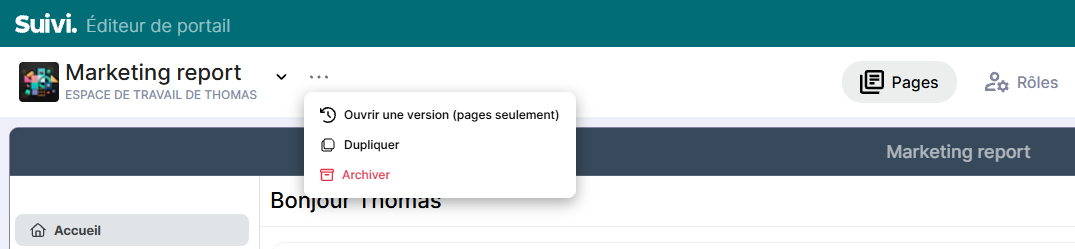
- Click on the … next to its name and choose the Duplicate menu
- Choose the duplication options.
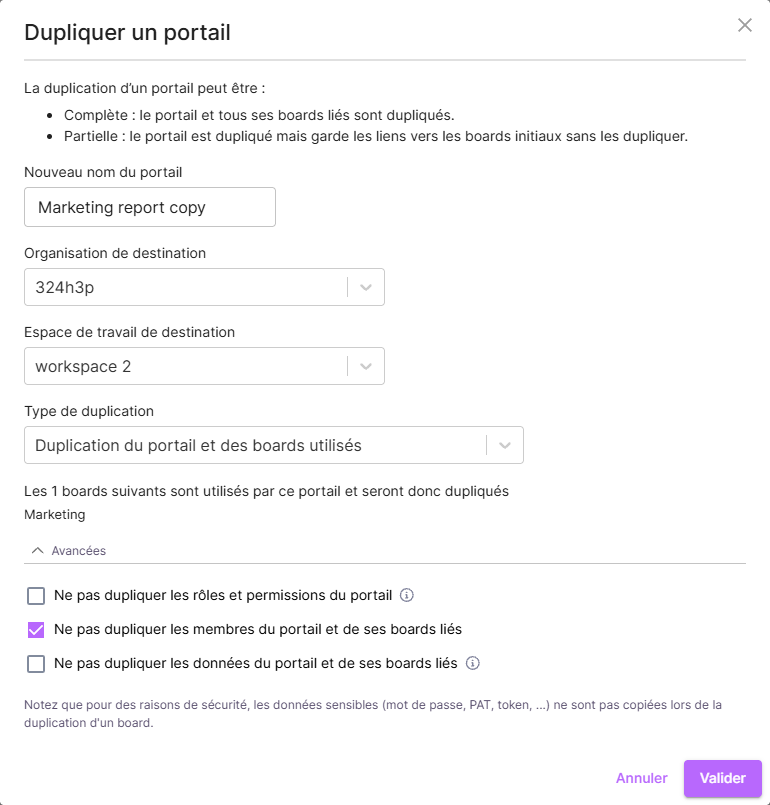
- New portal name: Determines the name of the new portal created by the duplication
- Destination organization: Displays if the user account has access to multiple organizations in Suivi. Allows you to choose the destination organization for the duplicated portal.
- Destination workspace: Allows you to choose the destination workspace
- Duplication type:
- Duplicate portal and boards used: Will duplicate the portal and all boards used by the portal in the new workspace.
- Duplicate portal only (links to boards used): Will duplicate the portal and keep the links to the original boards. Note that this option is not allowed if the duplication is to another organization.
The interface lists the boards used by the portal and the action taken based on the choice.
- Options:
- Do not duplicate portal roles and permissions: Enables/disables the preservation of portal roles and permissions
Warning: Users strictly associated with business roles in the portal will not be duplicated. Indeed, a user can only be a member if they have at least one role in the portal.- Do not duplicate portal members and its linked boards: Enables/disables the preservation of portal members and linked boards.
This option is not available when duplicating to another organization.Note that duplicating members also triggers sending an invitation notification to these members in the new duplicated board.- Do not duplicate portal data and its linked boards: Enables/disables the preservation of portal data and its linked boards.
The portal's editorial pages remain duplicated with their content.
- Confirm the duplication. Your portal duplication is performed as a background task. You will be notified as soon as it is available.
Duplicate a portal via API
Duplication can also be performed via API to automate the copying of a portal in an industrialized delivery context.
The API call allows you to:
- Create a new portal from an existing portal
- Copy associated boards
- Preserve relational links between duplicated boards
/public-api/Book/{bookId}/Copycurl -X 'POST' \
'https://run.dev.suivi.co/public-api/Book/01KVWDXWBAA3VQZ1NG8SMYzzzz/Copy' \
-H 'accept: text/plain' \
-H 'Content-Type: application/json' \
-d '{
"DestinationWorkspaceId": "01KVWD2DSA0C9R4SYCKQD7zzzz",
"BookLabel": "Portail Copié",
"CopyEntities": true,
"CopyBoards": true,
"CopyMembers": true,
"CopyApplicationRoles": true
}'Points to note
- Check the selected destination before starting the duplication.
- If you choose to reapply permission matrices, check the access rights on the duplicated portal after creation.
- After duplication, validate the navigation and links between boards to confirm that the entire portal is operational.