The Vulnerability Management board offers a comprehensive and operational solution for managing your information system security. It enables you to identify and categorize internal, external, and cloud vulnerabilities, prioritize actions, and track remediation through to closure.
Model Description
The Vulnerability Management board allows you to:
- Centralize vulnerabilities from scans, audits, or penetration tests.
- Prioritize fixes based on criticality, urgency, and scope.
- Track remediation progress and associated responsible parties.
- Provide progress and criticality indicators.
⇒ Serves as an operational management tool for cyber risk management, intended for CISOs, Technical Consultants, and SecOps Teams.
General principles
- Each row corresponds to an identified vulnerability.
- Vulnerabilities are segmented by
Scope: External, Internal, Web Application.
- The suivi is based on
Status,Gravité,Priorité,Avancement, andResponsable.
- The template provides dedicated views for import, suivi by scope, remediation, and dashboards.
- Integration is planned via API or CSV import.
Main Attributes
| Attribute | Type | Description |
|---|---|---|
| Subject | Text | Vulnerability name or CVE reference |
| Category | List | Vulnerability type (DNS Health, Application Security, Network Security, etc.) |
| Scope | List | Affected scope: External / Internal / Cloud |
| Severity | List | Criticality level: Critical / Major / Moderate / Low |
| Priority | List | Urgency: Immediate / Urgent / High / Normal / Low |
| Status | List | Progress status: New / In Progress / To Validate / Closed / Rejected |
| Asset | Multi-list | Impacted system or domain |
| Root Asset | Multi-list | Main domain or scope |
| Port(s) | List | Affected ports |
| Description | Rich text | Technical details of the vulnerability |
| Remediation | Rich text | Recommended corrective actions |
| Required Solution | Multi-list | Necessary tools or licenses |
| WAF | List | WAF status: Remediable / Out of Scope / Protected / Remediated |
| QuickWin | List | Quick fix possible |
| Progress | Percentage | Remediation progress |
| Discovery | Date | Identification date |
| Resolution (planned) | Date | Target correction date |
| Owner | User(s) | Person(s) in charge |
| ID | Text | Unique identifier |
| URL | Text | Associated link |
| Notes | Text | Internal or hidden field |
| Framework | List | Source or compliance framework |
| Detection Source | List | Origin of discovery |
| Vulnerability | Text | Precise description of the flaw |
| Attack Line | List | Attack context or scenario |
Proposed Views
| View | Type |
|---|---|
| Vulnerability Management | Kanban |
| Remediation | Card |
| Suivi | Grid |
| Roadmap | Metrolines |
| Criticality Indicators | Dashboard |
| Remediation Progress | Dashboard |
| External Perimeter Assignment | ReportTable |
| Internal Perimeter Assignment | ReportTable |
| Cloud Perimeter Assignment | ReportTable |
| Creation Form | Form |
| Remediation (User) | ListDetail |
| Remediation (Tech Lead) | ListDetail |
| Attack Paths | Card |
| Attack Paths | Dashboard |
Quick Start
Create a Board from the Template
- In the workspace of your choice, click on "Add a new board".
- Go to the CYBERSECURITY section and search for the template "Vulnerability Management".
- To access all template features, you must import the test data.
Follow the recommended workflow
- Identification: Import or manual creation of vulnerabilities (status: New)
- Qualification: Assignment of severity, priority, and assignment of a responsible party
- Planning: Definition of the resolution date and identification of required solutions
- Remediation: Change to "In Progress" status, update of progress
- Validation: Change to "To be validated" status once the correction is applied
- Closure: Change to "Closed" status after verification
Best Practices
- Systematic categorization: Use standardized categories to facilitate reporting
- Rigorous prioritization: Combine severity and business criticality to define priority
- QuickWins: Identify and prioritize quick fixes with high impact
- Regular Suivi: Update progress weekly
- Dashboards: Review indicators before security committees
- Required solutions: Identify license/tool needs to anticipate budgets and teams to mobilize
Imports and integrations
The board supports importing vulnerabilities from:
- ImportFromAPI: Automated import via API
- ImportFromCSV : Import from a CSV file
CSV mappings are preconfigured to facilitate integration with your scanning tools (Nessus, Qualys, etc.)
Criticality / Exploitability / Priority Indicators
Criticality
The criticality of a vulnerability corresponds to the severity of its potential impact on the information system. It is generally assessed using standards such as CVSS (Common Vulnerability Scoring System), which provides a score based on impact and technical characteristics, or CWSS (Common Weakness Scoring System), which enables more detailed analysis of software weaknesses.
Exploitability
Exploitability measures the likelihood that a vulnerability will actually be exploited in a real-world context. It relies notably on indicators such as EPSS (Exploit Prediction Scoring System), which estimates the probability of exploitation over time, and catalogs such as CISA's KEV (Known Exploited Vulnerabilities), which lists vulnerabilities known to be actively exploited.
Priority
Vulnerability prioritization is defined by combining their criticality and exploitability. A critical and highly exploitable vulnerability will be addressed as a priority, while a less critical or unlikely to be exploited vulnerability can be scheduled in a later remediation cycle. This approach optimizes resource allocation and effectively reduces risks.
Specific Uses
"Vulnerability Management" Section
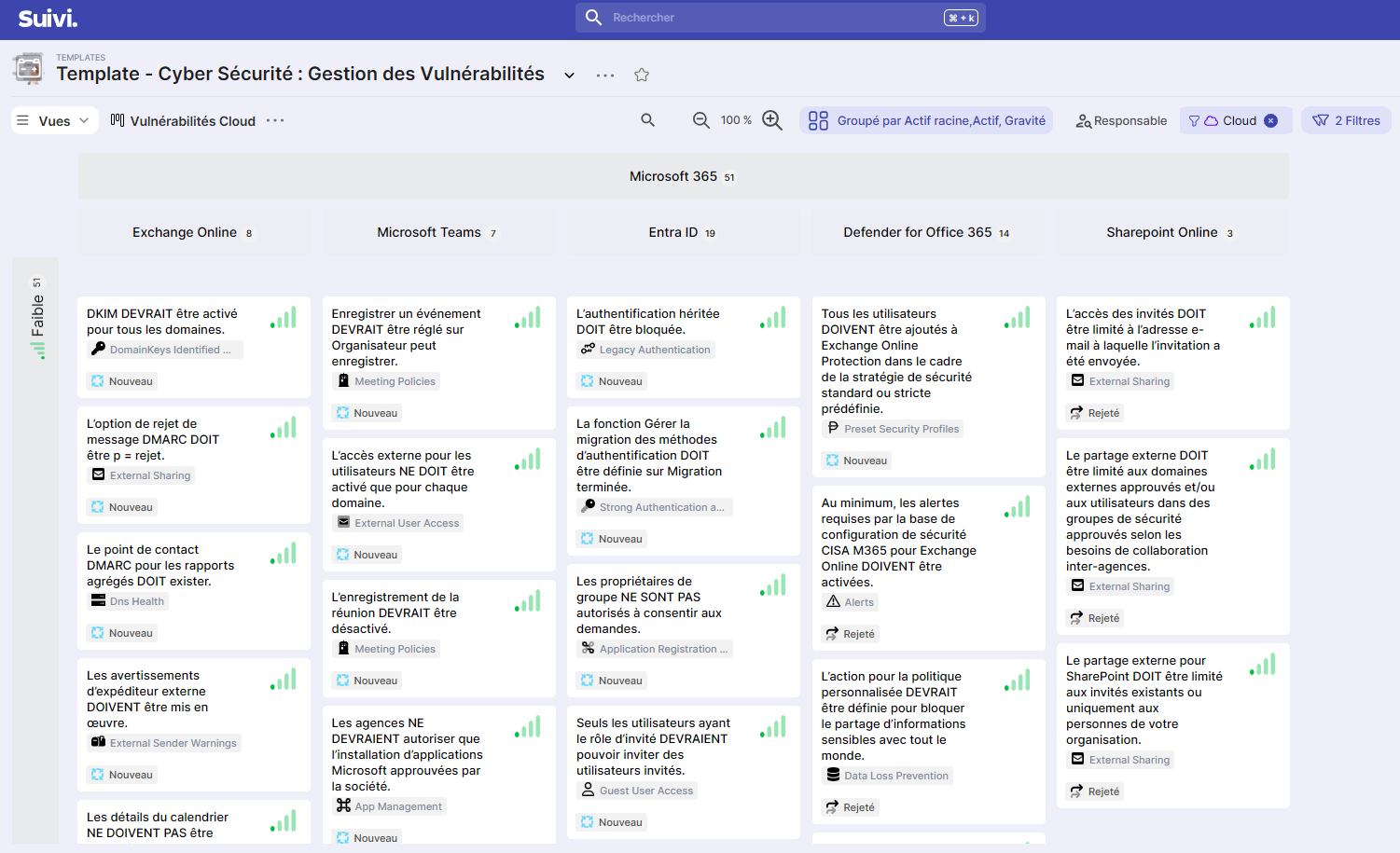
Kanban view by scope:
- External vulnerabilities: Display of vulnerabilities exposed on the Internet
- Internal vulnerabilities: Display of internal network vulnerabilities
- Web application vulnerabilities: Display of vulnerabilities on cloud services (M365, Azure, etc.)
Each view automatically filters by scope and organizes cards by severity and asset.
"Remediation" Section
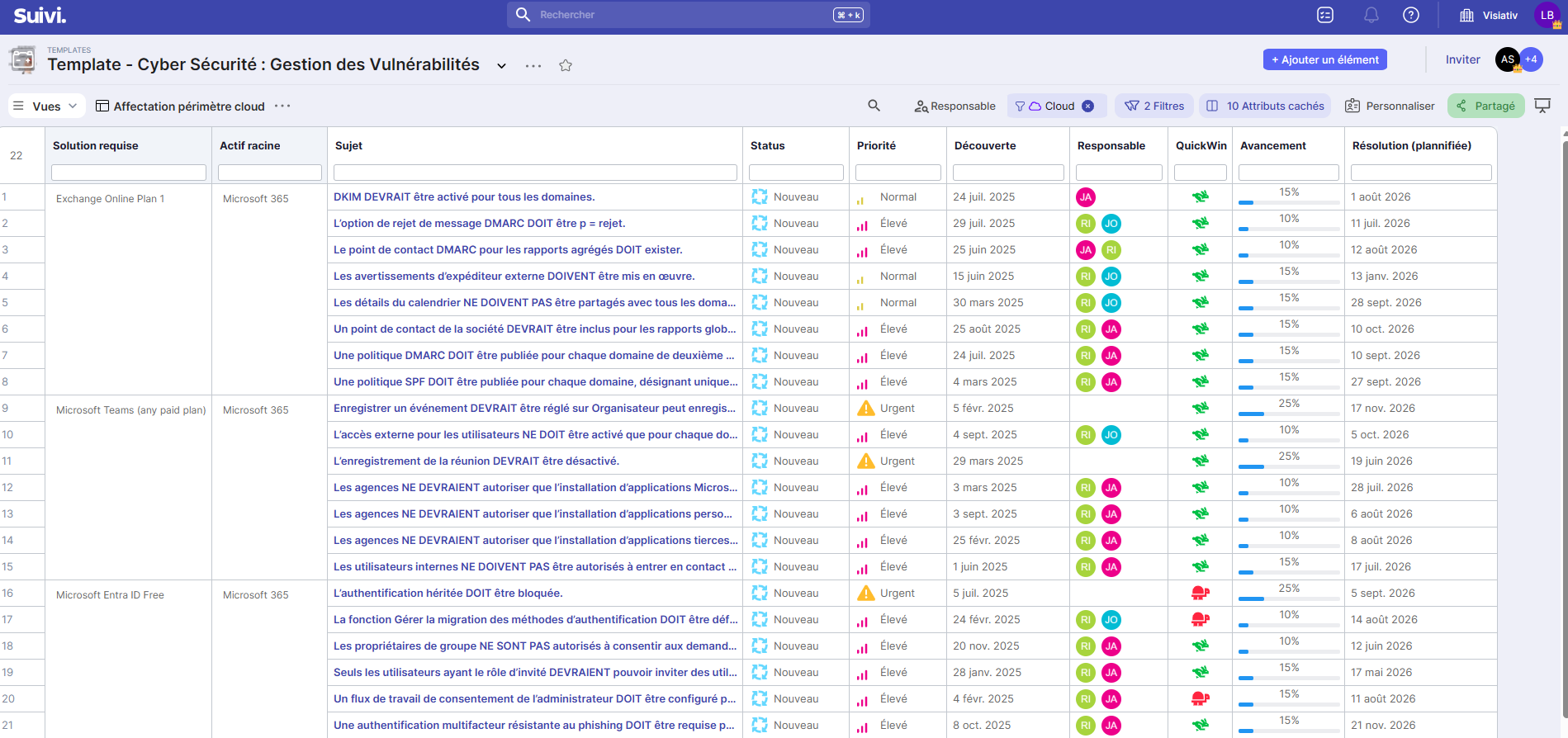
Assignment views by scope (External / Internal / Cloud).
These views allow you to manage the assignment of vulnerabilities being processed. The suivi of remediations is grouped by responsible party and required solution.
"Suivi" Section
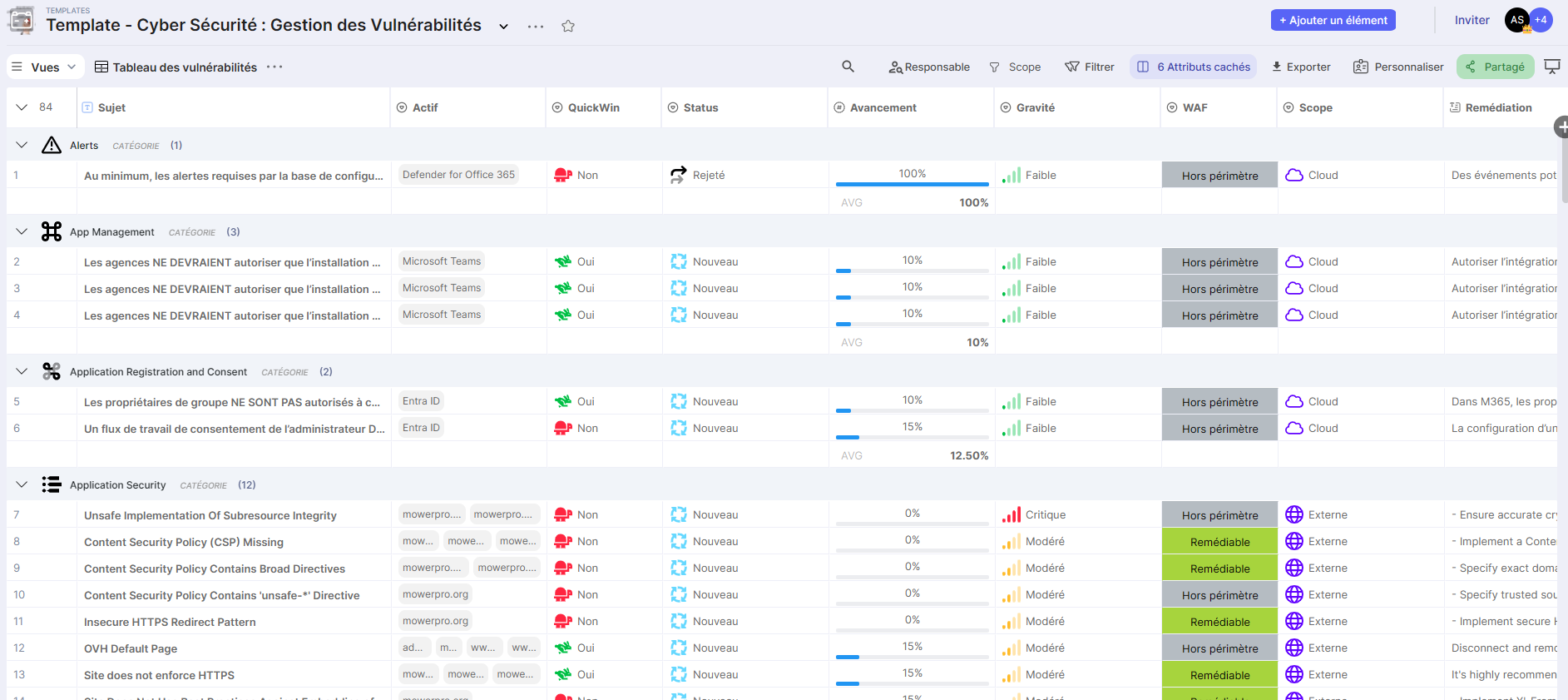
Vulnerability Table View: Structured view displaying all vulnerabilities with advanced filters. Ideal for daily data entry and updates.
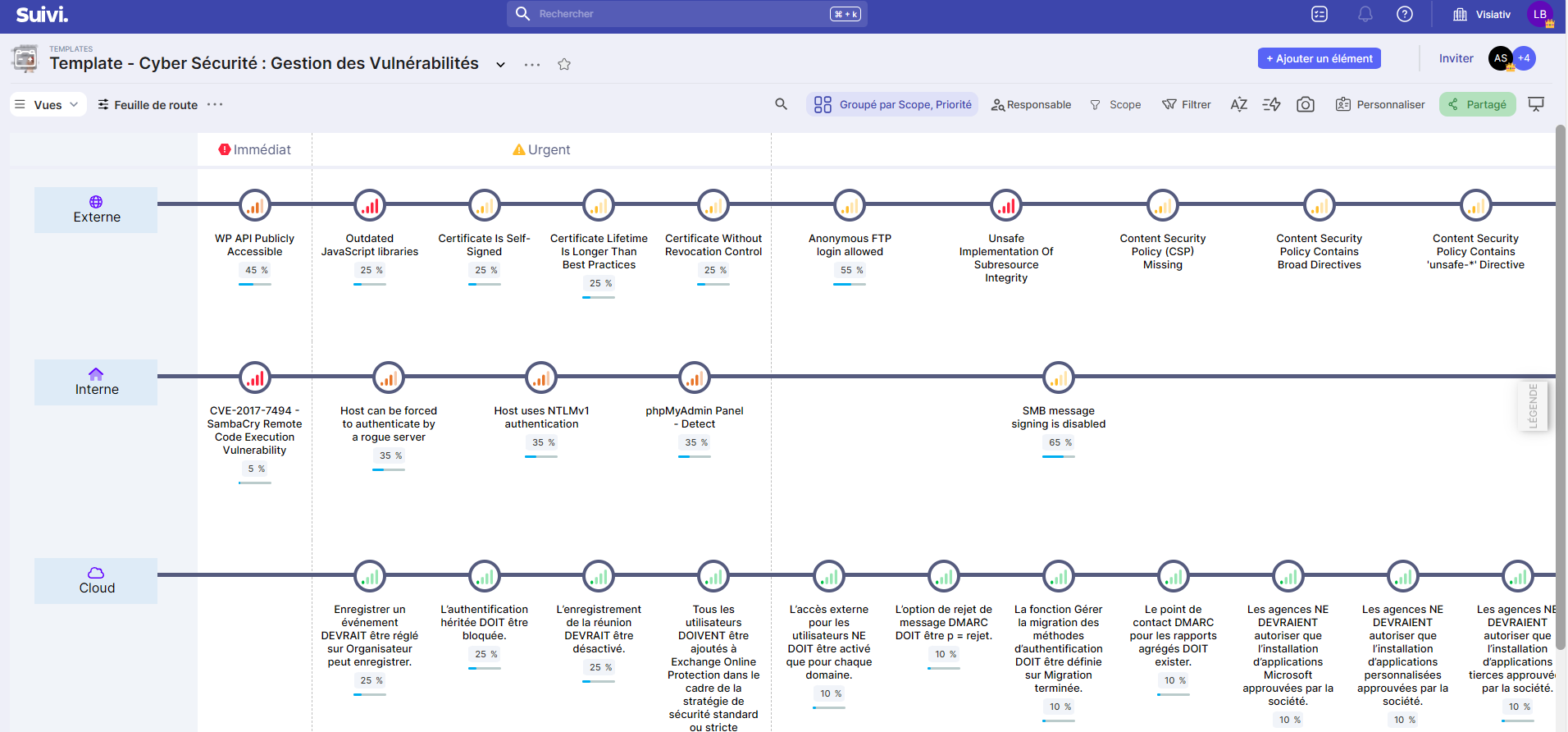
Roadmap View: Timeline view displaying planned remediations over time, organized by priority and required solution.
"Indicators" Section
Criticality Indicators Dashboard: Widgets displaying:
- Distribution by severity (External, Internal, Cloud)
- Criticality by vulnerability category
- Counters by scope
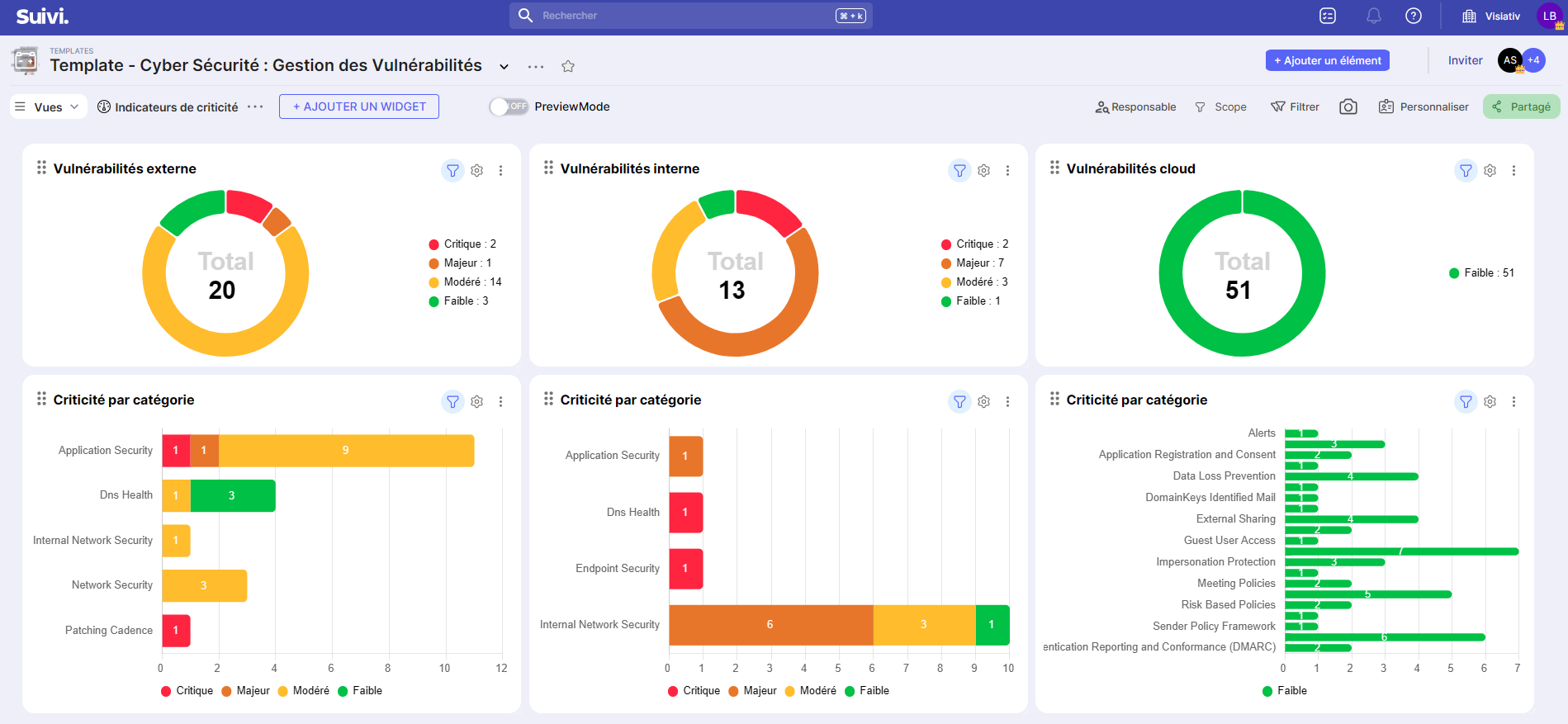
Remediation Progress Dashboard: Widgets displaying:
- Vulnerabilities by status and scope
- Average progress by category
- Planned remediations (timeline)
- Distribution by responsible party