What is the Formula attribute for?
The Formula attribute allows you to create calculated columns in your boards. Like in a spreadsheet, you write an expression that references other columns, and the result is calculated automatically for each item in the board.
Examples:
- Calculate a total cost:
{Prix unitaire} * {Quantité}
- Display a conditional status:
IF({Avancement} == 100, "Terminé", "En cours")
- Count remaining days:
DAYS({Date limite}, TODAY())
Creating a formula in 5 clicks
- In Table view, click on + Add a column and choose Formula (you can also go through the board menu > Attribute management).
- Enter a name (e.g., "Total Cost")
- Enter the formula (e.g.,
{Prix} * {Quantite}). You can use the different variables and operators provided in the assistant (insert by simply clicking on them).
- Choose the output format for the calculated data:
- Text -> displays text (e.g., "Complete")
- Number -> displays a number (e.g., 1500 EUR)
- Date -> displays a date (e.g., 06/15/2026)
- Click on Validate.
Formula writing methods
You have two ways to write your attribute formula:
- Either you click on an attribute in the list of suggested attributes (which will automatically add it to the editor):
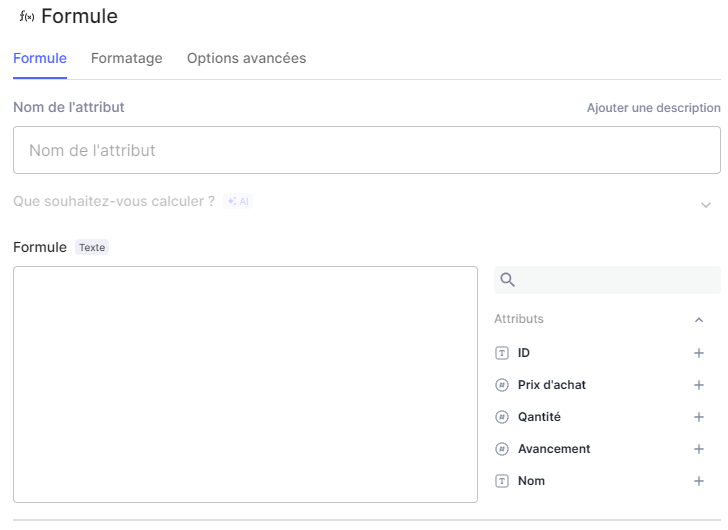
- Either you enter it manually by surrounding the attribute name with curly braces:
{Nom de la colonne}Examples:
{Prix}- label of the "Price" attribute that will have been created in your board
{Date limite}- label of the "Deadline" attribute
Important: The name must be exactly identical (accents, capital letters, spaces included) to the one entered when adding the attribute to your board.
Most Useful Formulas
Performing Arithmetic Operations
Available arithmetic operators: +, -, *, /, ^ (power)
Principle: Perform a calculation based on multiple data points from other attributes in the board.
{Prix d'achat} * {Quantité}Joining text
Principle: Obtain an identifier from last name, first name.
{Prenom} + " " + {Nom}Or with CONCATENATE:
Conditions: If... then... else
Principle: If a condition is true, display A, otherwise display B.
CONCATENATE({Prenom}, " ", {Nom})IF({Avancement} == 100, "Termine", IF({Avancement} == 0, "A faire", "En cours"))How does it work?
{Avancement} == 100- the condition (== means "equal to")
"Termine"- what we display if it's true
"En cours"- what we display if it's false
Available operators:
==-> equal
!=-> different
<-> less than
>-> greater than
<=-> less than or equal to
>=-> greater than or equal to
Choose from multiple options (SWITCH)
Principle: Display different results based on the value of a column.
SWITCH({Priorite}, "Critique", 4, "Haute", 3, "Moyenne", 2, 1)- If Priority = "Critical" -> displays
4
- If Priority = "High" -> displays
3
- If Priority = "Medium" -> displays
2
- Otherwise, if none of the 3 values, then display
1
Counting days (DAYS)
Principle: Count the number of days between two dates.
TODAY() = today (automatic)
DAYS({Date limite}, TODAY())Adding days (ADD_DAYS)
Principle: Adds X days to a date.
ADD_DAYS({Date de debut}, 30)Round a number (ROUND)
Principle: Round a number.
Handle errors (IFERROR)
Principle: If the formula causes an error, display a default value.
ROUND({Montant}, 2)IFERROR({Total} / {Nombre}, 0)- If dividing by 0 (error), display
0instead
Concrete example: Format: Number
| Total | Number | Result |
|---|---|---|
100 | 0 | 0 |
100 | 5 | 20 |
When to use which output format?
| Format | Use when... | Example |
|---|---|---|
| Text | The result is text (word, sentence, status) | "Termine", "Jean Dupont" |
| Number | The result is a quantity, price, or percentage | 1500, 75%, 10 jours |
| Date | The result is a date | 15/06/2026 |
Tip: if in doubt, try the format and adjust it if it's not right.
5 common errors
Error 1: Incorrect attribute name
Solution: Copy the attribute name exactly (capitals, accents, spaces).
Error 2: Forgetting the braces
Solution: Always surround attribute names with { }.
Error 3: Incorrect output format
Solution: Choose the format that matches the desired result (text -> Text, number -> Number, date -> Date).
Error 4: Dividing by a value not filled in on the element's attribute
Solution: Use IFERROR():
Error 5: Misplaced parentheses in IF
Solution: Parentheses must surround the entire IF expression.
Key points to remember
{Prix}  <- Mauvais ! L'attribut s'appelle "Prix total"
{Prix total}        <- Bon
Prix * Quantite <- Mauvais, pas de résultat
{Prix} * {Quantite} <- Bon{Prenom} + " " + {Nom}{Total} / {Nombre} <- Si Nombre est vide -> erreurIFERROR({Total} / {Nombre}, 0) <- Si erreur, affiche 0IF {X} > 10, "Oui", "Non" <- Mauvais
IF({X} > 10, "Oui", "Non") <- Bon- Formulas calculate automatically
{Libellé d'attribut}to reference an attribute
IF()for a Yes/No decision
SWITCH()to choose from multiple options
DAYS()to count days
- Always check the output format (Text/Number/Date)
- Attribute names must be exact